
GP-Extreme 12W Thermal Pad, 80 x 40 x 0.5 mm
12 W/mK · 80 × 40 × 0.5 mm
4.7 3,062 ratingscounted across all 5 thicknesses of this sheet size

Accessories
3.5 34 ratings
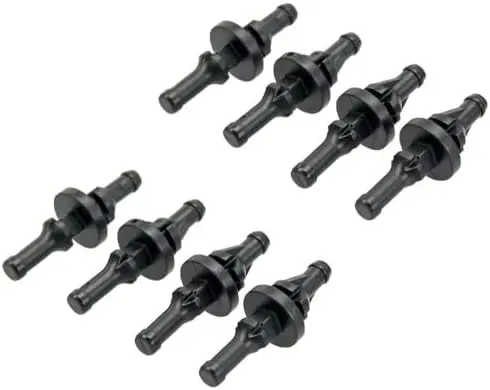
RB-GR02-B anti-vibration fan mounts: tool-free rubber pins for 80, 92, 120 and 140 mm fans.
$9.99
Low stock at our retail partner
Sold and shipped by an authorized retail partner. Price shown was current when this page was built.
Check price and buyRubber mounts replace the four metal screws that hold a fan to a case panel. They stretch through the mounting hole, grip on the far side, and leave the fan sitting on rubber rather than on steel. That one change removes the path along which a fan sends its vibration into the panel, which is where most of the buzz in a quiet build comes from.
A fan bolted rigidly to a thin steel panel turns that panel into a soundboard. The rotor is not much louder on its own; what you hear is the whole side of the case moving with it. Isolating the two with rubber leaves the fan making only the noise it actually makes.
Each mount is pushed through the fan corner and the case hole, then pulled from the other side until the waist seats. It takes a firm tug and a moment of feeling like something will tear. Nothing does, and removing a fan later is a matter of snipping or pulling rather than reaching behind a motherboard with a driver.
The set suits 80, 92, 120 and 140 mm fans, since all of them share the same corner hole geometry, and fits cases with mounting holes between 4 and 5.5 mm. Measure yours if the case is unusual: a hole larger than that will not hold the waist of the mount and the fan will sit loose.
A bearing that has started to rattle, an impeller with dust loaded unevenly on the blades, or a cable ticking against the frame will all sound exactly the same afterward. Isolation addresses transmitted vibration and nothing else, so check the obvious mechanical causes first.
12 W/mK · 80 × 40 × 0.5 mm
4.7 3,062 ratingscounted across all 5 thicknesses of this sheet size
1 g syringe
4.6 2,957 ratingscounted across all 2 pack sizes of this compound
15 W/mK · 90 × 50 × 0.5 mm
4.7 1,021 ratingscounted across all 5 thicknesses of this sheet size
15 W/mK · 90 × 50 × 0.5 mm · 2 sheets
4.8 734 ratingscounted across all 4 thicknesses of this sheet size


